Apollo Pricing Guide: Plans, Credits, and Who It Fits
Why Apollo pricing gets searched so often
Apollo sits in a useful middle ground.
It is not the cheapest tool in sales tech, but it is easier to approach than a platform like ZoomInfo. That is why a lot of buyers end up searching for Apollo pricing before they do anything else. They want to know whether Apollo is actually affordable, what the usage limits look like, and whether it fits the kind of prospecting they do every week.
That last part matters most.
A tool can be reasonably priced and still be the wrong fit.
Apollo pricing at a glance
Apollo has a free plan and paid plans that start at $59 per user per month. Higher tiers increase usage capacity and team features. Pricing changes, so check the current plan page before buying.
That makes Apollo more approachable than tools that hide everything behind enterprise sales calls.
But price alone is not the whole story. Apollo uses a usage model tied to credits and plan limits. So when you compare plans, think in terms of both subscription cost and how quickly your team burns through capacity.
Apollo plan breakdown: what each tier actually includes
Apollo has four tiers. Here is what each one is built for.
Free
The free plan is real, not a demo mode. You get a limited number of credits each month for email reveals. Contact search, basic filters, and limited sequences are available. The free plan is genuinely useful if you are validating whether Apollo's database covers your market before spending anything.
Where it breaks down: the monthly credit cap is low enough that any meaningful volume of outreach will hit it fast. You also lose access to some filters that matter for targeted searches, including certain industry and technology filters.
Good for: individual contributors testing the platform, or founders doing lightweight outreach to 20 to 30 contacts per month.
Basic (roughly $59 per user per month)
This is the entry point for real prospecting. Credit allowances go up meaningfully compared to free, and you get access to more filters. Sequences and basic workflow automation are included.
The Basic plan covers most of what an individual SDR or founder needs for consistent outbound. You can build lists, filter by title and company size, and push contacts into sequences without switching tools.
Where it breaks down: some of the more advanced features, including AI and predictive scoring, call recording, and deeper CRM sync capabilities, are reserved for higher tiers. Teams working high volumes will also notice the credit cap more.
Good for: solo salespeople, early stage founders, small agencies prospecting B2B accounts without a full SDR team.
Professional (roughly $99 per user per month)
Professional adds higher credit limits, more advanced call and workflow features, and stronger CRM integrations. If your team uses sequences heavily and wants better tracking across the pipeline, Professional is usually the step that makes it practical.
This tier also tends to access more granular filter options, which matters when you are trying to get specific about company size, funding stage, or technology stack.
Good for: growing B2B sales teams with at least two or three people actively prospecting, or agencies running multiple outbound campaigns simultaneously.
Organization (custom pricing, usually requires multiple seats)
The Organization tier is the full platform. It includes everything in Professional plus higher credit pools, advanced reporting, team management, and access to Apollo's AI features for prioritization and scoring.
Contracts at this tier typically involve minimum seat commitments. If you are evaluating this plan, expect to talk to someone in sales before you see real pricing, and plan around a minimum team size.
Good for: established sales teams with dedicated SDRs, outbound managers, and a CRM that needs to stay in sync.
What to actually budget: pricing vs. total cost
How the Apollo credit model works
Credits are the part of Apollo pricing that trips people up.
The short version: credits are consumed when you reveal contact information. Revealing an email address costs credits. Revealing a phone number costs credits. Exporting a contact record in bulk can also consume credits depending on what data you pull.
Credits reset monthly on your billing date. If you do not use them, they do not carry over, depending on your plan terms.
This matters because a lot of teams look at the seat price and assume that is their real cost. It often is not. If you exhaust your monthly credits before the end of the billing cycle, you either pause outreach or buy additional credits.
Here is a simple way to think about your credit burn:
Say your team sends 300 outreach emails per week and works 4 weeks per month. That is 1,200 contacts per month needing an email reveal. If your plan includes 1,000 credits and some of those also go toward phone reveals, you are buying overages. If each additional credit block costs $30 to $50, that adds real money to the monthly number.
Not every team hits this ceiling. Teams doing light outreach to named accounts may use 200 credits in a month. Teams doing high volume prospecting into cold lists will blow past the basic cap routinely.
The honest approach: estimate how many new contacts your team needs each month, multiply by the credit cost per reveal, and see whether the plan math holds before you sign up.
The real cost for a three-person SDR team
Here is concrete math.
Three SDRs on a Basic plan at $59 each: $177 per month in seat costs.
Each SDR needs roughly 500 new email reveals per month to run a meaningful outreach volume. That is 1,500 credits per month across the team.
If the Basic plan gives each user a credit allowance per month and that combined allowance is below 1,500, you are buying overages. Credit packs vary in cost, but budget an additional $50 to $150 per month for overages if your team works consistent volume.
Real monthly cost for that three-person team: somewhere between $220 and $330 depending on volume.
That is not outrageous. But it is different from the $177 seat cost that shows up first when you look at the pricing page.
The jump to Professional adds roughly $40 per seat per month but gives you more credits and better tooling. For a team burning through the Basic limits regularly, Professional is often worth the step up.
What you are actually buying with Apollo
Apollo is not only a contact database.
It is a broader sales workflow product built around:
- company and contact search
- title and geography filters
- outreach workflows
- CRM enrichment
- call and automation features on higher tiers
That bundle is why Apollo is popular with small and growing sales teams. You can do list building and at least part of outreach in the same product, which is appealing if you want fewer tools to manage.
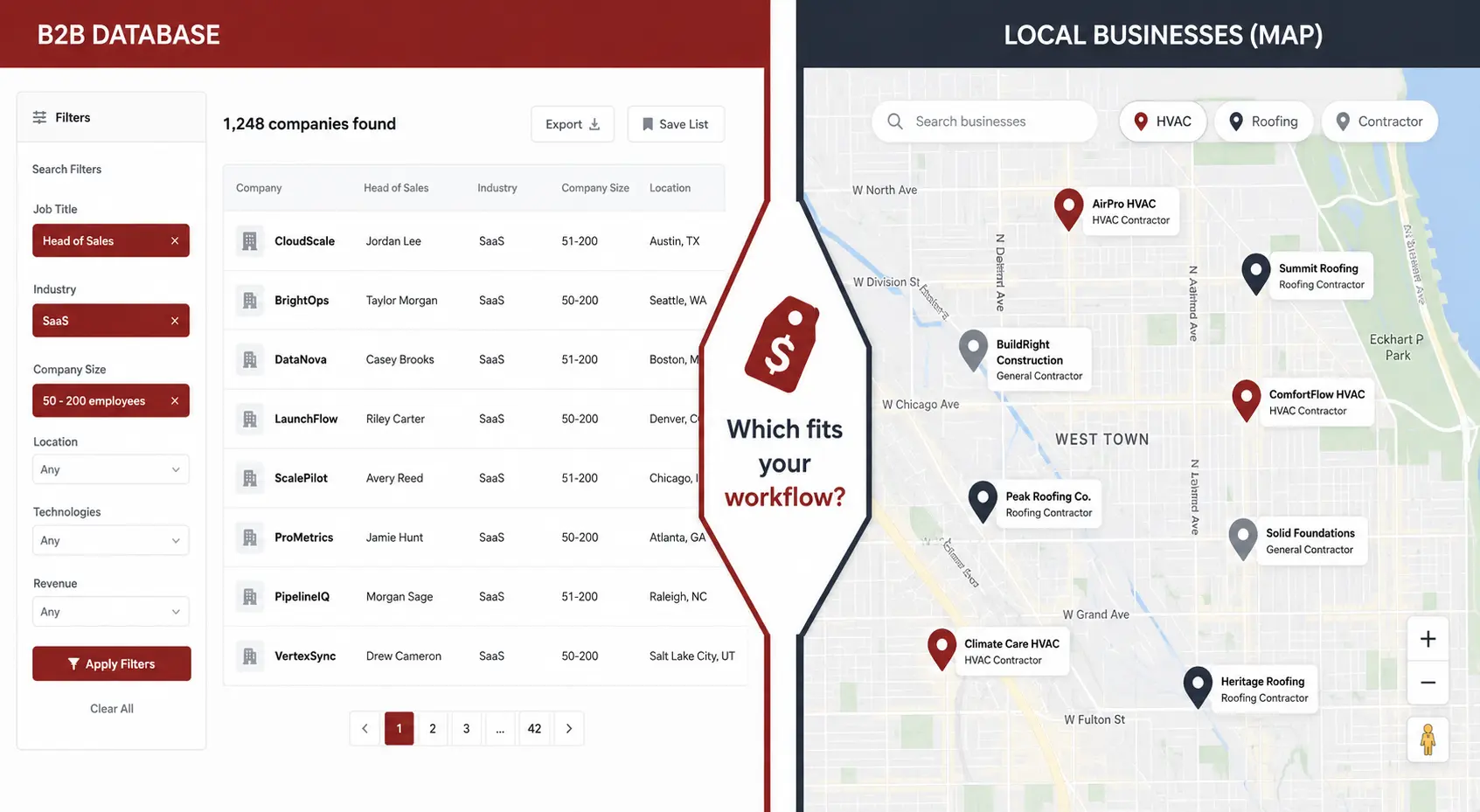
That said, Apollo is still built around a classic B2B database model. You search records that already exist in the platform. That is a different motion from searching Google Maps for businesses in a specific city and building a fresh list from there.
Comparing Apollo with local prospecting?
Search local businesses by city and find verified contacts with fresher data.
Try WebLeads freeTrial · No sales call · Cancel anytime
Who Apollo usually fits best
Apollo tends to fit teams that prospect like this:
- find companies by industry, size, and geography
- filter contacts by role or department
- build sequences around those contacts
- repeat that workflow across broad B2B segments
If that is your motion, Apollo makes sense.
It is especially useful when you care about titles, departments, and broad company search more than local business discovery.
Examples of good Apollo fit:
- SaaS outbound teams
- agencies selling into growing B2B companies
- SDR teams prospecting nationally
- founders doing title based outreach across many markets
Where Apollo gets weaker
Apollo gets weaker when local search is your starting point.
If your workflow looks more like this:
- pick a city
- pick a business type
- inspect the business website
- find the owner or contact
- verify the contact before outreach
then Apollo is usually not the cleanest tool for the job.
That is not because Apollo is bad. It is because the job is different.
Prospecting plumbers in Chicago, roofers in Phoenix, or HVAC companies in Dallas is not the same as building a list of B2B operations managers across the United States.
Two workflow scenarios
When Apollo is the right tool
A SaaS company sells project management software to mid-size logistics companies. Their SDR team of three focuses on Operations Directors and VP of Logistics titles at companies with 50 to 500 employees in the United States.
This is a textbook Apollo workflow. They set company size and industry filters, pull contacts by title, push them into a sequence, and repeat. The database covers those profiles well. The team burns through 400 to 500 credits per month per person and stays within the Professional plan limits. Apollo gives them a list and an outreach tool in the same place, which keeps things manageable.
The workflow is repeatable, scalable, and fits cleanly inside Apollo's model. The data they need exists in the platform. This is the use case Apollo was built for.
When Apollo is the wrong tool
A freelancer wants to find commercial HVAC companies in the Denver metro area, contact the owner directly, and pitch a bookkeeping service.
They search Apollo. Some HVAC companies show up, but coverage is uneven. Many small local businesses are not in the database at all, or their contact information is outdated. The decision to search by location plus business type does not map neatly to Apollo's filtering interface, which is built around industry codes and company attributes that do not always reflect how local service businesses are categorized.
The freelancer spends time manually validating results and still ends up with a shorter, less accurate list than they wanted. For this kind of local business prospecting, a workflow that starts with a fresh search for HVAC companies in Denver, pulls their websites, and then finds contact information would produce better coverage with less cleanup.
Apollo is not failing. It is just the wrong starting point for this job.
Apollo vs WebLeads
This comparison only makes sense when you look at the workflow, not just the monthly price.
| Category | Apollo | WebLeads |
|---|---|---|
| Starting price | $59 per user | Free, then $24, $69, $199 |
| Primary model | B2B database | Fresh search by business type and location |
| Best for | Broad B2B prospecting | Local business prospecting |
| Search style | Company and contact filters | Google Maps first workflow |
| Decision maker roles | Yes | Yes |
| Email verification | Part of broader workflow | Fresh Google Maps search, then contact and email verification |
The important difference is where the list begins.
With Apollo, you begin inside a database.
With WebLeads, you begin with a business type and location, then work outward from fresh search results and website level discovery. If you target local businesses, that starting point is often more natural.
What small teams should check before buying Apollo
If you are a small team, ask these questions before you buy:
1. Do we need broad B2B filtering, or local business discovery?
If you need roles, departments, and wide market coverage, Apollo is more logical.
If you start with city plus business type, a local tool may save time.
2. Will credits become a bottleneck?
Apollo looks affordable at entry level pricing, but usage matters. If your team works large lists every month, credits are part of the real cost.
Calculate how many reveals you need per month before you pick a plan. The gap between what a plan includes and what your team actually needs is where surprise costs come from.
3. Are we buying one tool or buying simplicity?
An all in one workflow is attractive. But only if the workflow matches how you actually prospect.
A neat dashboard does not fix a bad sourcing model.
4. Does the plan require a minimum seat count?
At the Basic and Professional level, Apollo generally works per seat with no team minimums. The Organization tier is different. If you are evaluating Organization pricing for a team of two or three people, ask explicitly about minimum seat requirements before you get into a negotiation. Some tiers include a floor that pushes the actual cost higher than the per-seat number implies.
5. How fresh is the data, and what do you do when it is wrong?
Apollo's database is large, but no static database is perfectly current. Email addresses go stale. People change roles. Company information drifts.
Before committing, test Apollo's data against a segment you know well. Pull 20 to 30 contacts in your target category and check how many emails bounce or how many contacts no longer hold the title shown. If the bounce rate in your specific niche runs high, that is a signal to factor in the real yield of each credit you spend.
For local business prospecting especially, data freshness is a real concern. Local service businesses open and close, change owners, and update contact information more often than large enterprises. A database that pulls from static sources will lag behind.
Is Apollo worth it?
For broad B2B prospecting, Apollo is one of the more approachable paid options.
It gives smaller teams a way into database driven outbound without pushing them straight into enterprise pricing.
For local business prospecting, the answer is more mixed. If your team sells to contractors, agencies, or service businesses in specific geographies, Apollo may not be where you want to start.
In that case, a search first workflow often makes more sense than a database first workflow.
Final takeaway
Apollo pricing is not outrageous. That is why so many teams seriously consider it.
But the real buying question is not "can we afford Apollo?"
It is "does Apollo match how we build lists?"
If your workflow is broad B2B search by company and role, Apollo is a reasonable fit.
If your workflow starts with local business discovery, a tool built around fresh search and contact discovery may be the better choice.
A simple buyer test helps here:
- If your team says, "we need heads of sales at software companies," Apollo is closer to the mark.
- If your team says, "we need HVAC companies in Dallas with real websites and reachable owners," a local search first tool is usually the better fit.
If your workflow is local business prospecting, see how WebLeads handles the Google Maps to contact list workflow, or read the full local lead generation guide for a broader breakdown.
Comparing Apollo with local prospecting?
Search local businesses by city and find verified contacts with fresher data.
Try WebLeads freeTrial · No sales call · Cancel anytime