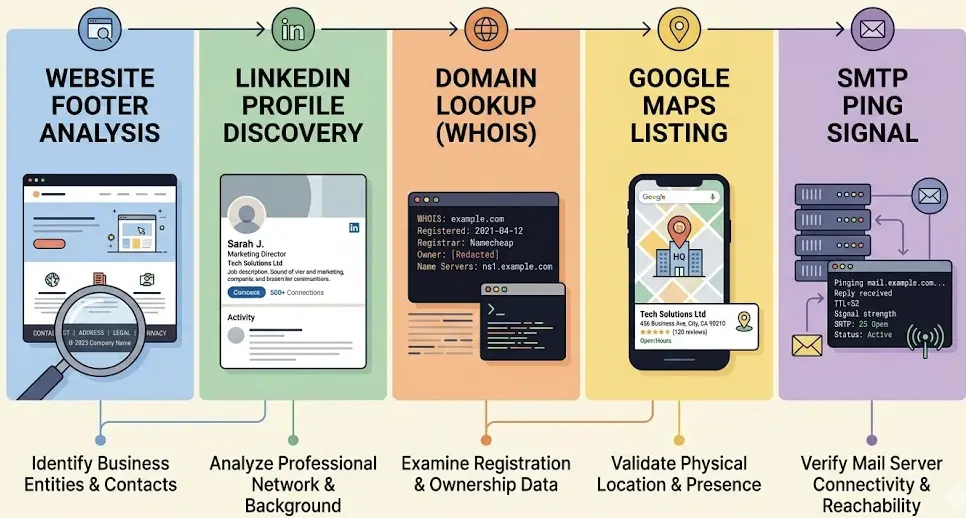
How to Find Email Addresses of Business Owners (5 Methods That Actually Work)
You found the business. You know they need what you sell. Now you need to reach the owner directly.
Not a contact form. Not an info@ address that sits in a shared inbox. Not a receptionist who forwards nothing.
That gap, between knowing a business exists and having a verified email for the person who actually makes decisions, is where most outreach grinds to a halt.
This guide covers five methods for finding business owner email addresses. Each one works in a specific situation. Each has genuine limitations. Read through all five, then use the decision table at the bottom to figure out which one fits your case.
What Makes a Good Email Find
Before diving into methods, it helps to know what you're actually looking for.
Verified, not guessed. Sending to unverified addresses raises your bounce rate. Bounce rates above 2% start to damage your sender reputation with providers like Gmail and Outlook, meaning even your valid emails can end up in spam. Verification is not optional if you're doing outreach at scale.
Owner or decision maker, not generic. info@, contact@, and support@ addresses typically go to staff who cannot say yes to anything. You want the owner, the general manager, or whoever signs off on purchases. The email matters less than whether the right person sees it.
Recent. Business owners change contact information. An email that was valid 18 months ago may now bounce or go to an inbox nobody monitors. Fresh data matters more than a large list of stale addresses.
Keep those three criteria in mind as you read through the methods below.
Method 1: Google Maps Scraping Tools
Best for: Local business owners at scale
If your targets are restaurants, contractors, agencies, salons, clinics, law firms, or any other category of local business, start here.
Google Maps is the most current local business directory on the internet. Owners who update their listings, add photos, and respond to reviews are the same owners who are active and reachable. It is the right starting point for local outreach.
Most Google Maps scrapers pull basic contact info from the listing. A few go further and crawl the business website to find actual owner email addresses.
WebLeads is built specifically for this workflow. It searches Google Maps and online directories in real time (not from a stored database), crawls business websites using Playwright to find contact emails, identifies decision maker names and roles (owner, manager, and similar titles), and verifies emails via SMTP. No third-party verifier needed.
You run a search like "HVAC contractors in Dallas" or "digital marketing agencies in Seattle" and get a list of matching businesses with owner names, titles, and verified emails.
Pricing (March 2026):
| Plan | Searches | Results/Search | DM Unlocks | Email Verifications | Price |
|---|---|---|---|---|---|
| Free | 2 lifetime | 10 | 10 lifetime | 20 lifetime | $0 |
| Starter | 1/day | 800 | 500/mo | 3,000/mo | $24/mo |
| Growth | 3/day | 1,500 | 2,500/mo | 10,000/mo | $69/mo |
| Scale | 7/day | 2,500 | 7,000/mo | 30,000/mo | $199/mo |
Pros:
- Fresh data pulled from Google Maps and online directories on each search, not a database snapshot
- Returns decision maker names and titles, not just email addresses
- Built-in SMTP email verification
- Scales well for ongoing local prospecting
Cons:
- Focused on local and small businesses (not ideal for enterprise or SaaS companies)
- Requires a clear business type and location to search
For local business outreach, this method outperforms everything else. Nothing else provides discovery, decision maker identification, and verification in one workflow.
See the find email addresses guide for more on this approach.
Method 2: LinkedIn Plus Email Guessing and Verification
Best for: Named individuals at known companies
You already know the person. You know their name and where they work. You just need their email.
Here is how it works:
- Find the person on LinkedIn (look for owner, founder, or managing partner)
- Note their first name, last name, and company domain
- Guess the email format (first@company.com, firstname.lastname@company.com, f.lastname@company.com, etc.)
- Use an SMTP verifier to confirm which format is correct before sending
Most professional business emails follow one of a handful of patterns. Tools like Hunter.io can help identify which format a particular company uses (see Method 3). For verification, ZeroBounce, Bouncer, and NeverBounce all offer free credits to start.
Pros:
- Free if you already have LinkedIn access
- Works for any company with a public web presence
- Useful for reaching a specific named person
Cons:
- Time-consuming at scale (manual research per person)
- LinkedIn limits profile views on free accounts
- Email format guessing fails a meaningful percentage of the time
- Local business owners often have no LinkedIn presence at all
When to use this: You have a short list of specific targets (10 to 50 people) and want to verify a particular contact before reaching out. Not practical for building a list of hundreds of businesses.
Method 3: Hunter.io and Domain-Based Search
Best for: Known companies with a professional web presence
Hunter.io is the standard tool for domain-based email finding. Give it a company domain and it returns a list of email addresses and patterns it has found associated with that domain.
This works well for B2B companies, tech firms, agencies, and consultancies where employees have professional emails indexed online.
How it works:
- Enter the company domain (e.g., acme.com)
- Hunter shows emails it has found on that domain
- It also surfaces the email pattern used (e.g., .@company.com)
- Use that pattern to construct the owner's likely email
- Verify before sending
Pricing (March 2026): Free tier includes 25 searches per month. Starter plan is €49/mo for 500 searches. Growth is €149/mo for 5,000 searches.
Pros:
- Fast and reliable for professional companies
- Email pattern detection saves significant guesswork
- Clean interface, well-established tool
- SMTP verification is included
Cons:
- Requires knowing the company domain upfront (no discovery workflow)
- Local small businesses often have no data in Hunter's database
- A plumber running johnsmithplumbing.com may return zero results
When to use this: You already have a list of company domains and need to find owner contact emails for each. Not useful if you need to discover businesses first.
See also: email finder tool comparison
Method 4: Manual Website Crawling
Best for: One-off lookups when you have time and a short list
This method costs nothing except time. You visit the business website and look for the owner's email directly.
Where to look:
- /contact page (most common)
- /about or /about-us page
- Footer (often has a direct email address)
- Team or leadership pages
- Blog author bylines
A lot of small business owners publish their personal email on their website because they want customers to reach them directly. That same email is the one you want for outreach.
If no email appears on the surface, try:
- View page source and search for "@"
- Check whether a blog exists with author bylines
- Look at press or media pages
Pros:
- Free
- Often finds direct owner emails not in any database
- Works for businesses at every size
Cons:
- Slow (5 to 15 minutes per business)
- Does not scale beyond 20 to 30 businesses without consuming significant time
- Many modern websites hide emails behind forms to avoid scraping
When to use this: You have 5 to 10 high-value targets and want to do thorough research before reaching out. Not viable for building a list of 500 or more businesses.
Method 5: WHOIS and Domain Registration Lookup
Best for: Small business owners who registered their own domain
When someone registers a domain, they fill in contact information: name, email, phone, and address. That registration data is called WHOIS.
Until 2018, most WHOIS data was publicly accessible. GDPR changed that for domains registered through European registrars, and many US registrars followed. Today a significant portion of WHOIS records are redacted.
But not all of them.
Small business owners who registered domains years ago, used a basic registrar, or opted out of privacy protection may still have their email visible in the public record.
How to check:
- Go to who.is or lookup.icann.org
- Enter the business domain
- Look for a registrant email in the results
If the record is redacted, you will see a privacy proxy address. That will not help you.
Pros:
- Free
- Sometimes surfaces an email that exists nowhere else
- Works for older domains and less technical business owners
Cons:
- The majority of records are now redacted
- Hit rate is low, typically 15 to 25% of small business domains
- The email found may be old or no longer monitored
When to use this: As a last resort when other methods have failed, or when you have a specific domain and want to exhaust every option.
Find local business owner emails at scale
Search any business type and location. Get owner names, titles, and verified emails from Google Maps and online directories. No stale database.
Try WebLeads freeTrial · No sales call · Cancel anytime
Which Method to Use When
| Your situation | Best method |
|---|---|
| Prospecting local businesses (contractors, agencies, salons, HVAC, etc.) | Method 1: Google Maps scraping tool (WebLeads) |
| You already have a list of company domains | Method 3: Hunter.io |
| You know the person's name and company | Method 2: LinkedIn plus email guessing |
| 5 to 10 high-value targets, want thorough research | Method 4: Manual website crawling |
| Nothing else worked, small business with an old domain | Method 5: WHOIS lookup |
For most people doing local outreach at volume, Method 1 (Google Maps scraping) is the most practical option. Methods 2 through 5 either do not scale or do not work well for local small businesses that are not indexed in professional databases.
For larger B2B companies where you already know your targets, Hunter.io combined with LinkedIn research covers most cases.
For one-off outreach to a handful of high-value accounts, manual website crawling plus WHOIS is worth the time.
Comparison: All 5 Methods at a Glance
| Method | Works for local SMBs | Scalable | Free option | Verified emails | Discovery included |
|---|---|---|---|---|---|
| Google Maps tools (WebLeads) | Yes | Yes | Yes (limited) | Yes | Yes |
| LinkedIn + guessing | Rarely | No | Yes | With extra tool | No |
| Hunter.io | Rarely | Yes | Yes (limited) | Yes | No |
| Manual website crawling | Yes | No | Yes | No | No |
| WHOIS lookup | Sometimes | No | Yes | No | No |
FAQ
What is the best free way to find a business owner's email?
Manual website crawling is the most reliable free method. Visit the business website, check the contact and about pages, and look in the footer. Many small business owners publish their direct email openly. If that fails, try a WHOIS lookup on the domain. For free tool access, WebLeads has a free plan with 2 lifetime searches.
How do I find a local business owner's email specifically, not a generic contact address?
Generic contact addresses often go to staff who have no buying authority. To reach the owner specifically, you need a tool that identifies decision maker names and roles. WebLeads pulls owner and manager names from Google Maps and online directory listings and cross-references them with emails found on the business website. See the find email addresses page for details on how this workflow runs.
Does Hunter.io work for finding small business owners?
Hunter works best for professional companies (agencies, tech firms, consultancies) that have multiple employees with publicly indexed email addresses. For a local plumber or restaurant owner, their domain often has little or no data in Hunter's database. A Google Maps tool is better suited for local SMB prospecting.
How do I verify an email address before sending?
Most email finder tools include verification. If yours does not, use a standalone verifier: Bouncer, ZeroBounce, NeverBounce, and Emailable all offer free credits to start. Verification works by sending an SMTP ping to the mail server. No actual email is sent to the address during this process.
Is it legal to find and use business owner email addresses for cold outreach?
Cold outreach to business email addresses is generally permitted under CAN-SPAM (US) and CASL (Canada) as long as you include an unsubscribe option and your business name and address. GDPR in the EU is stricter for B2C outreach, but business-to-business communication has more latitude. Always include an opt-out mechanism and honor removal requests promptly. Consult a lawyer for guidance specific to your jurisdiction and target market.
What does a verified email actually mean?
A verified email has been checked via SMTP against the mail server that handles that domain. The verifier confirms the mailbox exists before you send anything to it. Verified emails are far less likely to hard bounce. Keeping your hard bounce rate below 2% protects your sender reputation so your future emails continue to reach inboxes.
How fresh is the data from Google Maps tools?
It depends on the tool. WebLeads pulls from Google Maps and online directories in real time every time you run a search. You are not querying a stored snapshot from months ago. If a business opened last week and is already listed, it will show up in your results.
Find local business owner emails at scale
Search any business type and location. Get owner names, titles, and verified emails from Google Maps and online directories. No stale database.
Try WebLeads freeTrial · No sales call · Cancel anytime